
The traditional PRD process takes weeks of meetings and revision cycles. AI collapses that into hours — generating structured requirements, stress-testing your plan, and creating linked development tasks automatically.
Product Requirements Documents have a reputation problem. Everyone agrees they're important. Nobody wants to write them. And by the time a PRD makes it through three rounds of stakeholder review, the market has already moved.
Here's the thing: the problem was never the PRD itself. It was the process. Weeks of interviews, drafting in Google Docs, review cycles where half the comments are formatting nitpicks, and a final document that's already outdated before engineering starts their first sprint.
AI changes this equation fundamentally. Not by removing the need for clear requirements — that need is greater than ever — but by collapsing the cycle from weeks to hours while actually improving the quality of what comes out.
This post walks through exactly how we use AI to generate PRDs, break them into actionable tasks, and stress-test plans before a single line of code is written.

01Why PRDs Still Matter (Even More Than Before)
There's a tempting narrative in the AI era: "Just start building. The AI will figure it out." We see the aftermath of this thinking constantly at Apptivity. Teams that skip requirements and go straight to prompting end up with:
- Features that solve the wrong problem
- Conflicting implementations across the codebase
- No shared understanding of what "done" looks like
- Scope creep disguised as iteration
AI makes it easier to build fast. That means building the wrong thing fast is also easier. A good PRD is the difference between velocity and chaos.
The key shift is that AI doesn't replace the PRD — it replaces the painful process of creating one.
02Step 1: Describe Your Vision in Plain Language
Forget templates. Forget filling in 47 fields in Jira. The starting point for an AI-generated PRD is a plain-language description of what you want to build and why.
Here's a real example:
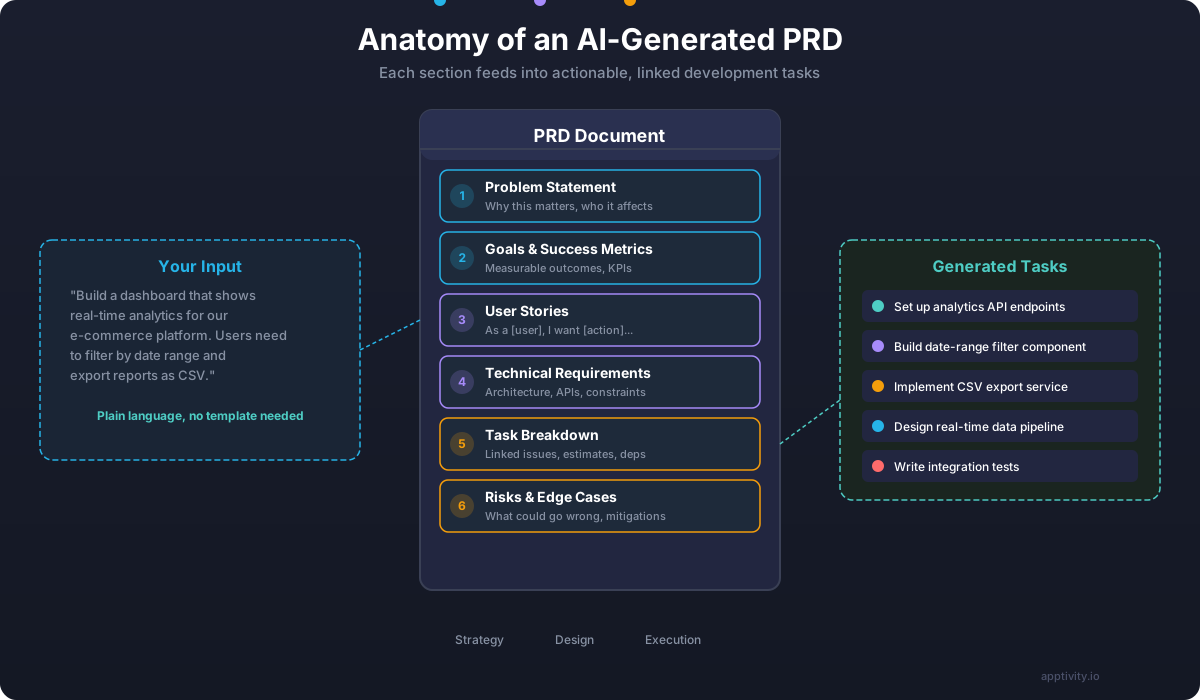
"We need a real-time analytics dashboard for our e-commerce platform. Store owners should be able to see revenue, orders, and conversion rates updated live. They need to filter by date range, compare periods, and export reports as CSV. Our biggest pain point is that merchants currently wait 24 hours for yesterday's data."
That's it. No headers, no user story format, no acceptance criteria syntax. Just the problem, the audience, and the core need.
The AI takes this and generates a structured PRD with:
- Problem Statement — articulated from the user's perspective
- Goals & Success Metrics — measurable outcomes tied to the problem
- User Stories — properly formatted, covering primary and edge-case flows
- Technical Requirements — architecture decisions, API contracts, constraints
- Task Breakdown — individual issues, sized and ordered
- Risks & Edge Cases — what could go wrong and how to mitigate it
The quality of the output depends on the quality of the input. Not in terms of format — the AI handles structure — but in terms of substance. The more you can say about why this feature matters, who it's for, and what constraints exist, the better the PRD will be.
Tips for Better Input
- State the problem before the solution. "Merchants can't see today's sales data" is better than "Build a real-time dashboard."
- Mention constraints early. "We're on PostgreSQL and can't add new infrastructure" shapes every technical decision.
- Name your users. "Store owners with 10-1000 orders/day" is more useful than "users."
- Share what you've tried. "We tried batch jobs but the 24h delay causes support tickets" gives the AI context about failed approaches.
03Step 2: Generate and Iterate on the PRD
Once the AI generates the initial PRD, you're not done — you're at the starting line. The first draft is a conversation starter, not a finished document.
This is where the process diverges from traditional PRD writing. Instead of scheduling a meeting to review a 15-page doc, you iterate in real time:
- "The success metric should be 'reduce data delay from 24h to under 5 minutes,' not just 'improve data freshness.'"
- "Add a user story for merchants who have multiple stores."
- "The technical section should mention that we're already using Redis for caching."
Each iteration refines the PRD in seconds. Changes cascade — updating a technical constraint automatically adjusts the task breakdown and risk assessment.
How AI Handles PRD Sections
The AI doesn't just fill in a template. It reasons about relationships between sections:
- A user story about exporting CSV files triggers a technical requirement for async processing (because large datasets will timeout on synchronous requests)
- A constraint about PostgreSQL triggers a risk about query performance at scale, which generates a task for implementing database indexing
- A success metric about 5-minute data freshness triggers architecture decisions about WebSocket vs. polling
This cross-referencing is something that takes a human PM hours of careful thought. The AI does it in the first pass.
04Step 3: Stress-Test with the Grill-Me Skill
Here's where it gets interesting. Generating a PRD is valuable, but the real power comes from adversarial review.
The grill-me skill (or similar challenge-based tools) acts like a senior technical PM who's been burned by bad specs before. It reads your PRD and asks the uncomfortable questions:
- "What happens when 10,000 merchants load their dashboards simultaneously at 9 AM?"
- "Your CSV export has no size limit mentioned. What happens with a merchant who has 500K orders?"
- "You specified WebSocket for real-time data. What's your fallback for clients behind corporate proxies that block WebSocket?"
- "The PRD mentions 'compare periods' but none of the user stories cover this. Is it in scope or not?"
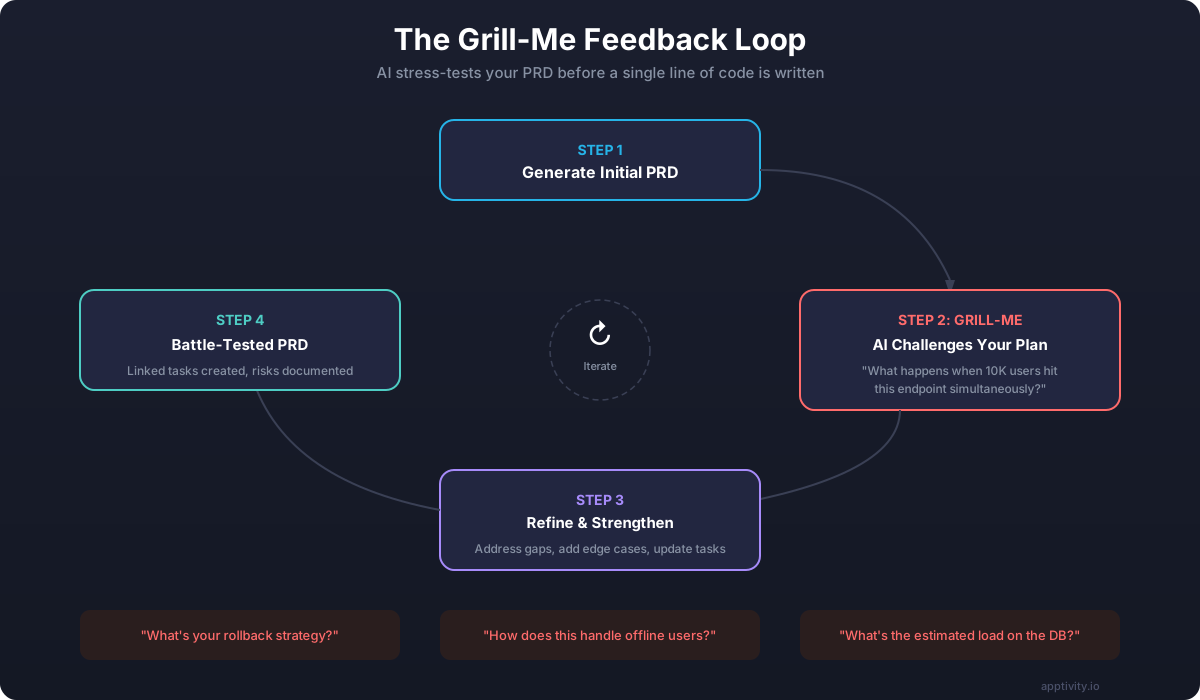
Each challenge forces you to either strengthen the PRD or consciously descope. Both outcomes are valuable. The worst thing a PRD can do is leave ambiguity that only surfaces during implementation.
What Gets Caught
In our experience, the grill-me process consistently catches:
- Missing error states. What happens when the data pipeline is down? What does the user see?
- Scalability gaps. The PRD works for 100 users but falls apart at 10,000.
- Conflicting requirements. "Real-time updates" combined with "minimize server costs" needs a conscious trade-off.
- Undefined boundaries. "Export reports" could mean a simple CSV or a formatted PDF with charts — the PRD should say which.
- Security oversights. Multi-tenant data access, rate limiting, authentication edge cases.
This is the equivalent of three rounds of stakeholder review compressed into a 10-minute AI conversation.
05Step 4: From PRD to Linked Issues
This is where AI-assisted planning delivers its biggest time savings. Once the PRD is finalized, the AI generates linked development tasks automatically.
Not a flat list of to-dos. Actual structured issues with:
- Parent/child hierarchy — epics contain stories, stories contain tasks
- Dependencies — "API endpoint" blocks "Dashboard UI" because the frontend needs data
- Acceptance criteria — derived from the PRD's user stories and technical requirements
- Size estimates — based on complexity signals in the requirements
- Risk tags — tasks that address identified risks are flagged for extra review
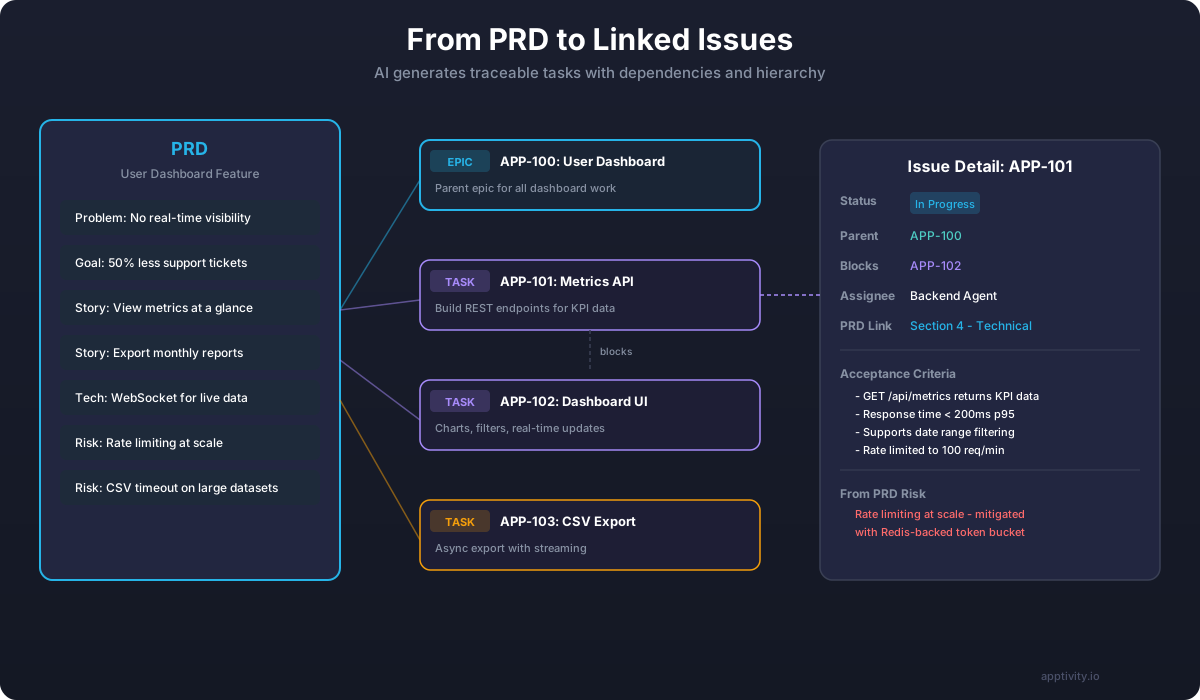
The link between PRD sections and generated tasks is bidirectional. Every task traces back to a specific requirement. Every requirement has at least one task implementing it. If a requirement has no task, the AI flags it. If a task doesn't trace to a requirement, something went wrong.
This traceability is critical. When a stakeholder asks "why are we building this?" six weeks into development, the answer is one click away — not buried in a forgotten Google Doc.
Task Generation in Practice
Here's what the task breakdown looks like for our dashboard example:
Epic: Real-Time Analytics Dashboard (APP-100)
| Task | Depends On | Estimate | Risk |
|---|---|---|---|
| APP-101: Build metrics REST API | — | Medium | Rate limiting |
| APP-102: Implement WebSocket data pipeline | APP-101 | Large | Scale/proxy |
| APP-103: Dashboard UI components | APP-101 | Large | — |
| APP-104: Date range filter + period comparison | APP-103 | Medium | — |
| APP-105: CSV export service (async) | APP-101 | Medium | Large datasets |
| APP-106: Load testing + performance benchmarks | APP-102 | Small | — |
| APP-107: WebSocket fallback (SSE/polling) | APP-102 | Medium | — |
Notice that APP-107 (WebSocket fallback) only exists because the grill-me process identified proxy issues as a risk. Without adversarial review, this would have been discovered in production.
06Context Management: The Multiplier
There's a pattern we see with teams that struggle with AI-assisted planning: they treat every conversation as a fresh start. They paste context. They re-explain decisions. They lose the thread between sessions.
This is where context management skills become essential. Tools like PARA-based memory systems give the AI persistent knowledge across sessions:
- Project context — what's been decided, what's in progress, what's blocked
- Architecture decisions — why we chose PostgreSQL, why we use Redis, what our deployment looks like
- Past PRDs — patterns that worked, mistakes that were made, scope decisions and their rationale
- Team context — who owns what, what skills are available, what the capacity looks like
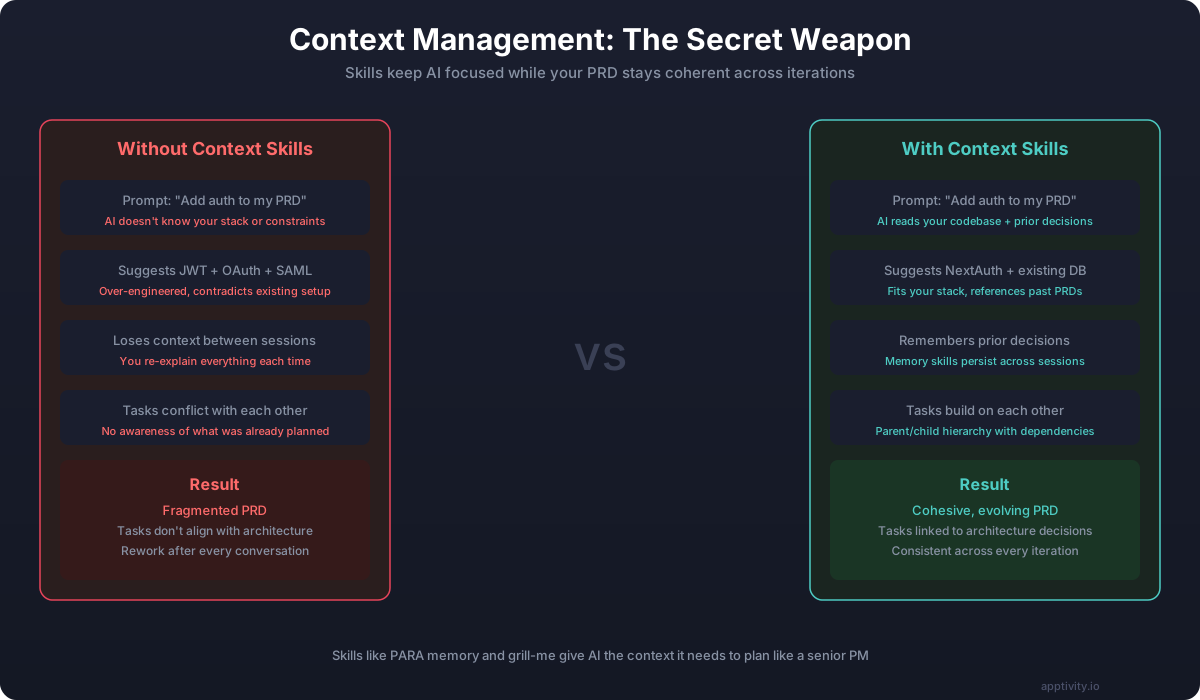
With proper context management, each PRD iteration builds on everything before it. The AI doesn't suggest SAML authentication for a startup with 50 users because it knows your scale. It doesn't propose a microservices architecture for a team of three because it remembers the "keep it simple" decision from last month.
07The Workflow in Practice
Here's how we use this at Apptivity for client projects:
- Kick-off conversation (30 min) — Client describes what they need in plain language. We ask clarifying questions.
- AI generates initial PRD (5 min) — Structured document with all sections populated.
- Collaborative refinement (30-60 min) — We walk through the PRD with the client, iterating in real time. Changes are instant.
- Grill-me session (15 min) — AI stress-tests the plan. We address gaps together.
- Task generation (5 min) — Linked issues created automatically.
- Development begins (same day) — Not next sprint. Same day.
Total time from idea to first task in progress: under 2 hours.
Compare this to the traditional process: stakeholder interviews (1 week), PRD draft (3-5 days), review cycles (1-2 weeks), task breakdown (2-3 days), sprint planning (1 day). That's 3-4 weeks if everything goes smoothly — and it never goes smoothly.
08Common Mistakes to Avoid
AI-assisted PRD generation is powerful, but it's not magic. Here are the patterns that lead to bad outcomes:
1. Skipping the "Why"
If you tell the AI what to build without explaining why, you'll get a technically complete but strategically useless PRD. The AI will faithfully document a feature that nobody needs.
Always lead with the problem. "Our merchants lose revenue because they can't see today's sales data" produces a fundamentally different PRD than "Build a real-time dashboard."
2. Accepting the First Draft
The first AI-generated PRD is a starting point. Teams that accept it without iteration end up with generic requirements that don't reflect their specific context, constraints, or users.
Iterate at least twice. Challenge the assumptions. Ask "what's missing?" explicitly.
3. Ignoring the Grill
When the grill-me skill asks "what's your fallback plan?", the answer should never be "we'll figure it out later." If you can't answer the question now, add it to the PRD as an open item with an owner and a deadline.
4. Losing Context Between Sessions
Every time you start fresh with "here's what we discussed last time...", you're paying a context tax. Invest in memory and context management tools so each session builds on the last.
5. Treating Tasks as Final
AI-generated tasks are a starting point for sprint planning, not a finished sprint backlog. Engineers should refine estimates, add implementation details, and flag technical concerns during planning.
09What This Means for Your Team
The shift from manual to AI-assisted PRD creation isn't just about speed — though the speed difference is dramatic. It's about quality of thinking.
When the mechanical work of structuring, formatting, and cross-referencing is handled by AI, humans can focus on what they're actually good at: understanding users, making trade-off decisions, and spotting the things that don't fit neatly into templates.
The best PRDs we've seen come from teams that treat AI as a thinking partner, not a document generator. They challenge the AI's assumptions. They feed it real user feedback. They use adversarial tools to find the cracks. And they end up with plans that are genuinely better than what either humans or AI would produce alone.
If your team is still spending weeks on PRDs — or worse, skipping them entirely and paying the price in rework — it's worth trying this workflow. Start with one feature. Describe the problem in plain language. Let the AI structure it. Grill it. Generate the tasks. See how it feels.
You might not go back.
At Apptivity, we use AI-assisted planning for every client engagement. If you want to see this workflow in action on your own product, [reach out](https://apptivity.io) — we'll walk through a live PRD session with your team.